Archive tutorial: this English version describes the original software and interface. Steps and screenshots may differ from current versions.
Joomla provides user management features for creating users within defined groups.
These groups can give registered users access to content that ordinary visitors cannot view. This guide creates a user in the Registered group.
- In the administration area, click Users > User Manager.
- Click New to create a user.
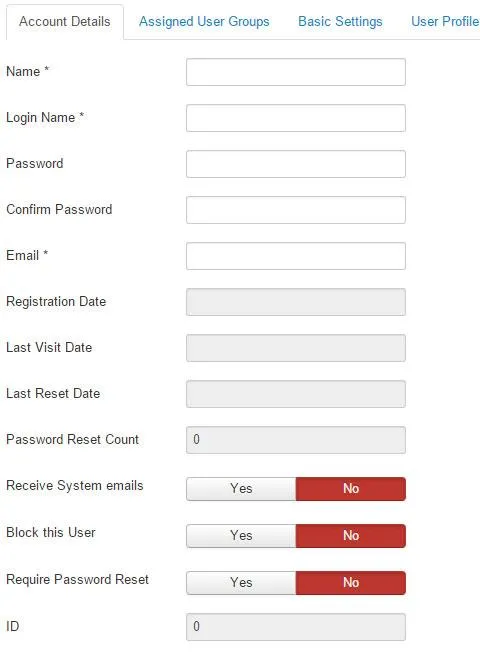
- Under Account Details, enter Name, Login Name, Password and the repeated password, plus a valid Email address.
- Under Assigned User Group, tick Registered.
- User Profile is optional. Complete it if you want to retain additional user information. Registered users can also update this section themselves.
- Click Save or Save & Close.
That is all.
Original guide illustrations


Links from the original guide
https://alfatihstudio.com/tips/wp-content/uploads/2015/05/user-1.jpg
https://alfatihstudio.com/tips/wp-content/uploads/2015/05/new-user.png
https://alfatihstudio.com/tips/wp-content/uploads/2015/05/user-2.jpg
https://alfatihstudio.com/tips/wp-content/uploads/2015/05/user-3.jpg
https://alfatihstudio.com/tips/wp-content/uploads/2015/05/user-4.jpg
https://alfatihstudio.com/tips/wp-content/uploads/2015/05/user-5.jpg