Managing Pav Blog Posts and Categories in OpenCart

Panduan Menguruskan Blog pada Web Opencart

Archive tutorial: this English version describes the original software and interface. Steps and screenshots may differ from current versions.

Websites using PavoThemes’ Pav Blog module have a blog management area within their e-commerce system. This guide covers blog posts and categories.

Go to Extensions > Modules and click Edit for Pav Blog Management.

The Dashboard contains the following icons:

  • Categories: manage blog categories.
  • Add Category: create a category.
  • Blogs: list existing blog posts.
  • Add Blog: create a post.
  • Comment: list comments submitted by readers.
  • Modules Setting / General Setting: configure the website’s blog page.
  • Frontend Modules: configure sidebar modules such as latest posts and latest comments.

Managing blog categories

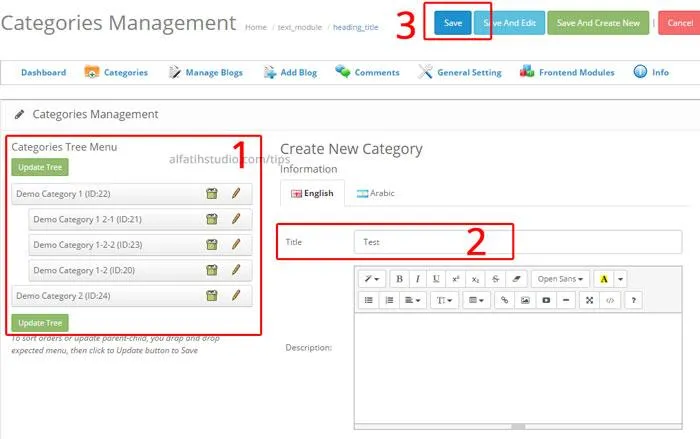
  1. Click Categories (a) on the Dashboard.
  2. To add a category, enter its name in Title (2), then click Save (3). It appears in the list on the left (1).
  3. In the next illustration, (1) is the new category. Use button (2) to delete a category or button (3) to edit one.

Drag categories up or down to reorder them, or to the right to make a subcategory. Then click Update Tree.

Managing and adding posts

  1. Click Blogs to see existing posts.
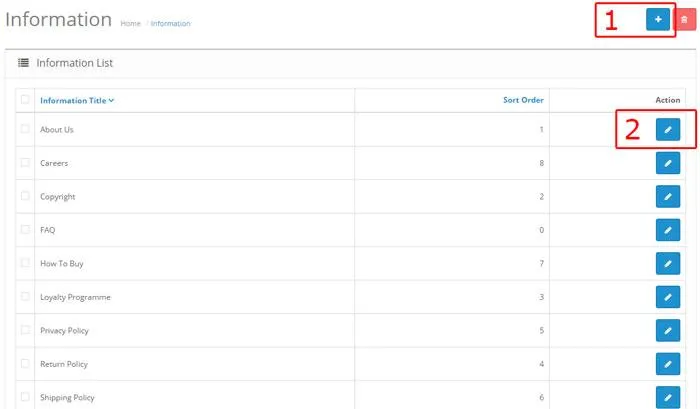
  2. Click Edit (1) to change a post. View its click count in column (2). To delete, tick a post in box (3) and click Delete (4), or use Unpublish (5).
  3. Click Add Blog (6) to add an article.
  4. Complete the required fields in Add Blog: choose a category (1), select Yes for Status to publish (2), select Yes for Featured if required (3), enter relevant keywords (4), enter a title (5), add a short homepage description (6), and enter the full article in Content (7).

The Content area also supports images, bold, italic and other text formatting.

  1. Under Image-Gallery, add a relevant article image (1) for the blog’s front page. You can also enter a YouTube embed code in field (2).
  2. When finished, click Save at the top. Done.

Original guide illustrations

Panduan-Menguruskan-Blog-pada-Web-Opencart-1
Original guide illustration 1. Interface wording is shown as captured.
Panduan-Menguruskan-Blog-pada-Web-Opencart-2
Original guide illustration 2. Interface wording is shown as captured.
Panduan-Menguruskan-Blog-pada-Web-Opencart-3
Original guide illustration 3. Interface wording is shown as captured.
Panduan-Menguruskan-Blog-pada-Web-Opencart-3
Original guide illustration 4. Interface wording is shown as captured.
Panduan-Menguruskan-Blog-pada-Web-Opencart-4
Original guide illustration 5. Interface wording is shown as captured.
Panduan-Menguruskan-Blog-pada-Web-Opencart-5
Original guide illustration 6. Interface wording is shown as captured.
Panduan-Menguruskan-Blog-pada-Web-Opencart-3
Original guide illustration 7. Interface wording is shown as captured.
Panduan-Menguruskan-Blog-pada-Web-Opencart-6
Original guide illustration 8. Interface wording is shown as captured.
Panduan-Menguruskan-Blog-pada-Web-Opencart-7
Original guide illustration 9. Interface wording is shown as captured.
Panduan-Menguruskan-Blog-pada-Web-Opencart-8
Original guide illustration 10. Interface wording is shown as captured.

Links from the original guide

http://www.pavothemes.com/?atid=60

https://alfatihstudio.com/tips/wp-content/uploads/2016/06/Panduan-Menguruskan-Blog-pada-Web-Opencart-1.jpg

https://alfatihstudio.com/tips/wp-content/uploads/2016/06/Panduan-Menguruskan-Blog-pada-Web-Opencart-2.jpg

https://alfatihstudio.com/tips/wp-content/uploads/2016/06/Panduan-Menguruskan-Blog-pada-Web-Opencart-3.jpg

https://alfatihstudio.com/tips/wp-content/uploads/2016/06/Panduan-Menguruskan-Blog-pada-Web-Opencart-4.jpg

https://alfatihstudio.com/tips/wp-content/uploads/2016/06/Panduan-Menguruskan-Blog-pada-Web-Opencart-5.jpg

https://alfatihstudio.com/tips/wp-content/uploads/2016/06/Panduan-Menguruskan-Blog-pada-Web-Opencart-6.jpg

https://alfatihstudio.com/tips/wp-content/uploads/2016/06/Panduan-Menguruskan-Blog-pada-Web-Opencart-7.png

https://alfatihstudio.com/tips/wp-content/uploads/2016/06/Panduan-Menguruskan-Blog-pada-Web-Opencart-8.png

Related articles