Archive tutorial: this English version describes the original software and interface. Steps and screenshots may differ from current versions.
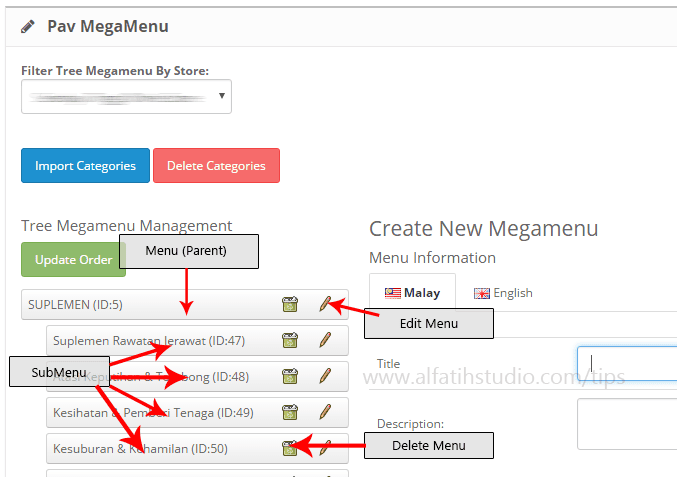
Some OpenCart 2.0 websites using PAV have a menu system with additional features and drag-and-drop organisation.
Editing the main menu in Pav MegaMenu
- Click Extensions > Modules.
- In the module list, click Edit for Pav MegaMenu.
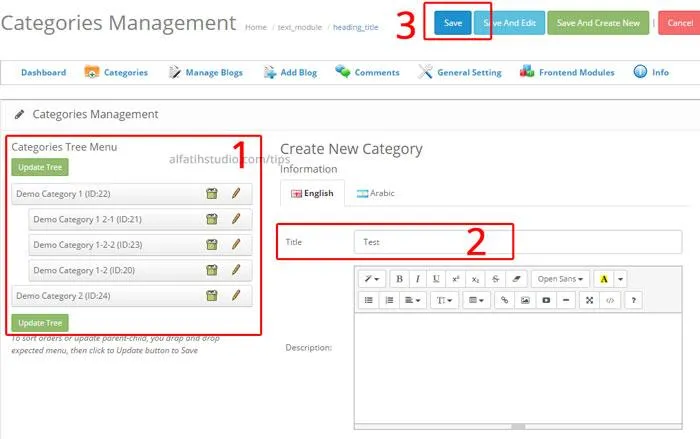
- The left-hand area lists the menus already entered on the website.
- Drag a menu item to the required position to arrange it.
- To create a menu item, enter its name in Title. Choose a Type, such as URL, Category or Information. For Information, select the information page to link to. For Category, choose the category the menu should link to.
- If your website is bilingual, open the second language, such as English, and enter its title. The other fields do not need changing.
- Click any Save button when finished. Done.
Original guide illustrations


Links from the original guide
https://alfatihstudio.com/tips/wp-content/uploads/2016/08/Cara-Edit-menu-pav-menu-1.png
https://alfatihstudio.com/tips/wp-content/uploads/2016/08/Cara-Edit-menu-pav-menu-2.png
https://alfatihstudio.com/tips/wp-content/uploads/2016/08/Cara-Edit-menu-pav-menu-3-1.png
https://alfatihstudio.com/tips/wp-content/uploads/2016/08/pav-mega-menu-opencart.gif
https://alfatihstudio.com/tips/wp-content/uploads/2016/08/Cara-Edit-menu-pav-menu-6.png
https://alfatihstudio.com/tips/wp-content/uploads/2016/08/Cara-Edit-menu-pav-menu-4.png
https://alfatihstudio.com/tips/wp-content/uploads/2016/08/Cara-Edit-menu-pav-menu-5.png